14. Profiles
A profile launches plank as a different agent. It brings its own system prompt, its own set of builtin tools, its own settings, and its own logo, name and accent colour, and it can bring MCP servers, skills and hooks with it. The same binary becomes a coding assistant, a mail assistant or a budget analyst depending on what you start it with:
plank --profile aovestdipaperino/plank-profiles:HALThe theming is what you notice first. HAL's manifest names a logo, a
display name and a #d0021b accent, so the banner shows
HAL's art and version above plank's, and the rules around the prompt
turn red where plank's are green:
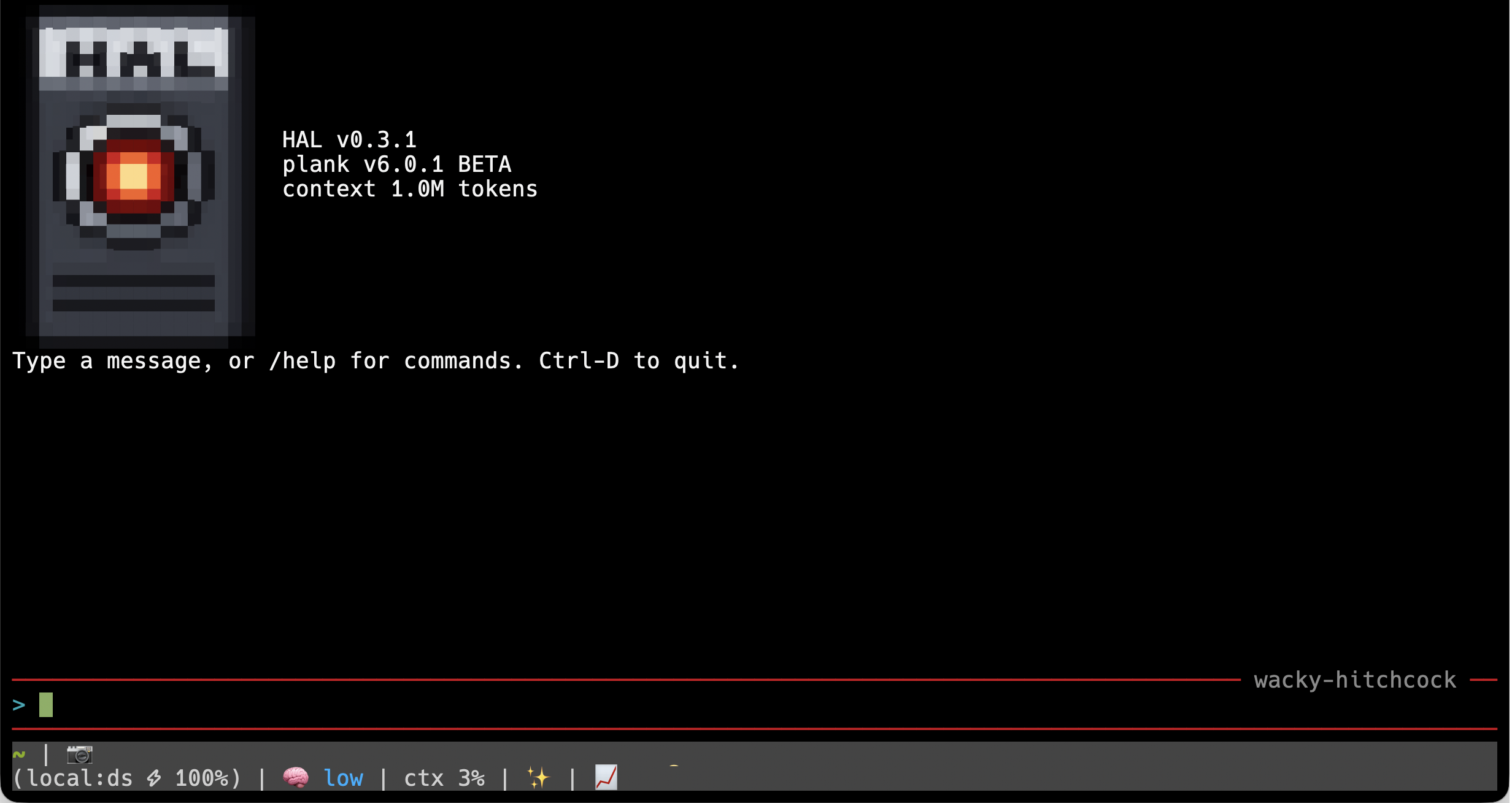
Under the hood a profile is an ordinary plugin whose
plugin.json carries a profile block. Without
--profile nothing about it is active, so installing one
never changes a normal plank session.
Launching a profile
--profile takes three kinds of argument, and plank works
out which one you meant:
| You pass | plank does |
|---|---|
an installed name, hal |
launches it |
a folder, examples/profiles/chatbgt |
asks to install it, then launches it |
owner/repo:folder,
aovestdipaperino/plank-profiles:HAL |
fetches that folder of the GitHub repository's default branch, asks to install it, then launches it |
Plain owner/repo works too, for a repository that is a
single profile. --profile with no name lists what is
installed.
The first launch from a folder or a repository asks before anything is fetched or written:
Install the profile aovestdipaperino/plank-profiles:HAL into /Users/you/.plank/profiles? [Y/n]After that the same command line launches the installed copy straight
away, because the install remembers where it came from. With no terminal
to ask on (a pipe or a headless run) nothing is installed, and the error
names the /install-profile command that would do it.
To launch a profile often, give it a shell alias:
alias HAL='plank --profile hal'Installing and removing
Installing from --profile is the usual way, but
/install-profile does the same from inside a session:
/install-profile aovestdipaperino/plank-profiles:HAL
/install-profile https://github.com/you/profiles/tree/main/research
/install-profile ./my-profile
It accepts a git repository, a marketplace repository, a
.tar.gz, a local folder, and the
owner/repo:folder shorthand. Installed profiles live in
~/.plank/profiles/<name>/, a folder plank never scans
as plugins, so an installed profile contributes nothing until
--profile names it. The install is refused when the
manifest has no profile block, when its
systemPrompt is missing or empty, or when a profile of that
name is already installed.
There is no uninstall command. Remove a profile by deleting its folder:
rm -rf ~/.plank/profiles/halUpdates
A profile's version is its manifest's version field, as
MAJOR.MINOR.PATCH. Every launch by source
(--profile owner/repo:folder or a folder path) checks the
version the source offers now, without downloading the profile: a
folder's manifest is read directly, and a GitHub profile costs one small
request of at most three seconds. If the source is newer, plank
asks:
Update profile hal 0.3.0 -> 0.3.1? This replaces the installed copy, including changes made with /edit-profile. [Y/n]The same version, an older one, or a check that cannot be made
(offline, no version) launches what is installed and
downloads nothing. The old copy is kept aside until the new one has
installed, so a failed update never leaves you without the profile. A
launch by installed name alone (--profile hal) does not
check for updates.
Writing a profile
A profile is a folder with a manifest and a prompt:
my-profile/
├── .plank-plugin/plugin.json
├── prompt.md
├── logo.png          (optional)
└── .mcp.json         (optional)
The manifest's profile block describes the agent:
{
  "name": "research",
  "description": "A reading and note-taking assistant",
  "version": "0.1.0",
  "profile": {
    "displayName": "Scholar",
    "logo": "logo.png",
    "accent": "#3fa9c5",
    "systemPrompt": "prompt.md",
    "tools": { "builtin": ["read", "more", "glob", "search", "google_search", "visit_page"] },
    "settings": { "ui": { "showThinking": false } },
    "folderContext": false,
    "agentsMd": false
  }
}| Field | What it does | When left out |
|---|---|---|
systemPrompt |
the file holding the whole system prompt; the one required field | not a profile |
displayName |
the name in the banner and the window title | the plugin's name |
logo |
a PNG drawn as the banner art | plank's logo |
accent |
the TUI's accent colour, an ANSI index ("160") or
#rrggbb |
plank's green |
tools.builtin |
the builtin tools the agent may use; every other one is withheld | every builtin |
settings |
a settings layer, anything but engine.* |
none |
folderContext |
whether the session starts with the launch folder's git status and
.plank/MEMORY.md |
false |
agentsMd |
whether AGENTS.md is read, offered and linked |
false |
recommendedModel |
an engine to run, such as "qwen", used only when its
model file and every companion it declares are already on disk |
the usual model choice |
steering |
a steering direction from ~/.plank/models/vectors.json
to run with the recommended engine: direction, and
optionally ffn, attn and
from |
unsteered |
verbs |
the status-bar verbs, replacing plank's own | plank's verbs |
additionalVerbs |
status-bar verbs added to plank's own; cannot be combined with
verbs |
nothing added |
A malformed optional field warns and falls back to its default rather
than stopping the launch. A malformed tools.builtin fails
closed, to an empty list, so a typo never hands the agent more tools
than you wrote down.
folderContext and agentsMd default to
false because most profiles are not about the folder you
happen to launch them from. A mail assistant started in a code checkout
should not be told the checkout's git status or offered an
AGENTS.md. A coding-style profile sets both to
true. Your own memory, ~/.plank/MEMORY.md, is
loaded either way.
recommendedModel lets a profile suggest the engine it
works best with, and plank takes the suggestion only if that engine is
locally available: its main model file and every companion it declares
must already exist on disk. It outranks engine.model in
your settings but never a --model you typed, and it never
starts a download: when the engine is not installed (main or a companion
missing), or is not an engine at all, plank prints one line saying so
and picks the model the usual way.
steering pairs a named direction with that engine, so a
profile can ship an agent that leans a particular way.
direction names one of the model's entries in
~/.plank/models/vectors.json (see Steering); ffn and
attn are the two scales, 1 and 0 when left out, and
from is "user" or "all", as on
the command line:
"recommendedModel": "ds4vision",
"steering": { "direction": "succinct", "ffn": 0.8 }
The direction applies only when the recommended engine is the one
that runs, since a direction belongs to the model it was built on: a
--model choosing another engine, or a recommendation that
fell through, runs unsteered. A --dir-steering you type
wins, scales included. The vectors themselves are not part of the
profile, so whoever runs it needs the direction in their own file (a
missing one stops the launch rather than running unsteered), which
pt install can merge in from wherever you publish it.
verbs and additionalVerbs give a profile
its own voice in the status bar, the word that says what the agent is
doing while you wait. verbs swaps plank's vocabulary out
and additionalVerbs mixes more into it; declare one or the
other, since a manifest with both gets a warning and plank's own verbs.
Either can be a plain list, used whatever the agent is doing, or an
object that sorts the words by moment: thinking,
generating, tool (a tool is running),
prefill (reading the context) and fun (the
rare one-in-twenty surprise). A moment the object leaves out keeps
plank's words for it. The three published profiles each replace the lot:
d3v1l schemes and smites, EAP muses and versifies, HAL computes and
actuates.
"verbs": {
  "thinking": ["Computing", "Calculating"],
  "tool": ["Actuating", "Engaging"],
  "fun": ["Singing Daisy 🌼"]
}
The prompt
The prompt file replaces plank's system prompt entirely. To keep tool
calls working, include the token {{plank:tool-protocol}}
where the tool instructions should go; plank expands it to the call
syntax the model was trained on and appends the schemas of the tools the
profile allows. A prompt without the token still loads, for a chat-only
agent, and plank warns about it at startup.
MCP servers
An .mcp.json in the profile folder starts MCP servers
for that profile only. The builtin allow-list does not reach them: every
tool an MCP server exposes is available, so limit a server with its own
options. HAL, below, is the worked example.
Editing the running profile
/edit-profile opens the running profile's manifest,
prompt and any settings.json or .mcp.json in
the built-in editor as one buffer, under a header that says where each
setting comes from:
<!-- plank profile "hal", loaded from profile /Users/you/.plank/profiles/hal
     displayName      HAL                          manifest
     accent           #d0021b                      manifest
     systemPrompt     prompt.md                    manifest
     tools            read more glob search ask    manifest (tools.builtin)
     folderContext    false                        default (off for a profile)
     ...
Saving checks the whole buffer first and writes only the files that changed. Because a profile is set up once at launch, a change then offers Restart now, which saves the session, quits plank the normal way and reopens the same conversation under the edited profile. Editing an installed profile edits the installed copy, and the next update from its source replaces it.
Sessions
A session remembers the profile that started it and resumes only under the same one, since its transcript was written against that profile's prompt and tools. The hint plank prints on exit says so:
Resume it later with: plank --profile hal /resume sneezy-hahnWorked example: HAL
HAL is a mail assistant over one Outlook mailbox, published at aovestdipaperino/plank-profiles.
Its mail tools come from Softeria's ms-365-mcp-server,
started through npx (so it needs Node.js) and limited to
eleven mail tools. The token it holds covers Mail.ReadWrite
and never Mail.Send, so HAL can read, flag, draft and file
mail but cannot send or delete it.
Sign in once, with the same tool filter HAL uses, then launch it:
MS365_MCP_TENANT_ID=consumers npx -y @softeria/ms-365-mcp-server@0.156.2 \
  --enabled-tools '^(list-mail-messages|list-mail-folders|list-mail-child-folders|list-mail-folder-messages|get-mail-message|list-mail-attachments|update-mail-message|create-draft-email|create-reply-draft|move-mail-message|create-mail-folder)$' \
  --extra-scopes User.Read \
  --login
plank --profile aovestdipaperino/plank-profiles:HAL
HAL's README covers the details: which limits the mail server enforces, which ones only its prompt asks for, and why web access next to a mailbox deserves a second thought.